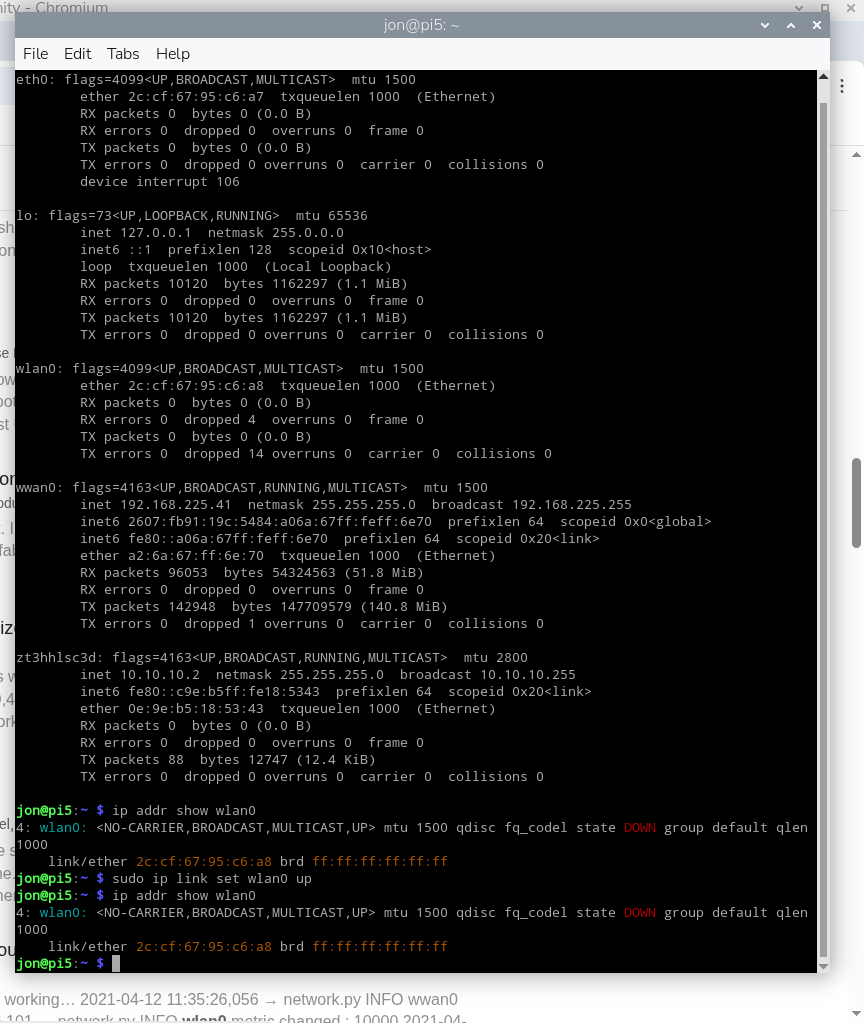
I feel like I can’t be the only person who had this issue, but my search in the forum didn’t yield anything. I’m not an average Linux user, so talk to me like I have a -20 IQ. lol
My wlan0 disappeared after getting the 4G modem working. I ran sudo ip link set wlan0 up, which made it show up in ifconfig (it wasn’t before). I tried but the status is still down (as seen in the img).
Since this is a Raspberry Pi networking configuration matter (not Sixfab hardware-related), you may also find useful discussions on the official Raspberry Pi forums.
I understand that it may seem like a Raspberry Pi issue, but this issue started as soon as I installed the Sixfab 4G hat. I’m currently performing a 24h runtime battery test, so I can’t remove the hat to see if the wlan0 comes back, but I’ll do that as soon as the runtime test is done.
I finally had the chance to remove the 4G hat, and can confirm that it was not directly responsible for the issues with wlan0. It seems that due to instructions I was provided for making the 4G hat work, wlan0 was left unmanaged. I had to get it managed under networkmanager and now I have wwan0, wlan0 and eth0 working simulataneously.