RM502Q-AE Registers Successfully on Windows but not on Raspberry Pi OS

Hello there,

I have the 5G Modem Kit with the Quectel RM502Q-AE installed on a Raspberry Pi 5 running Raspberry Pi OS. After following the 5G Setup Instructions, I could not get the module to connect to the Internet using a Boost Mobile SIM.

As such, I connected the USB data port to my Windows PC to update the module and rule out bad FW. The new FW didn’t change anything, but for the fun of it, I tried sending AT commands from my Windows PC (instead of the Raspberry Pi) to see if that made a difference. Somehow, this immediately allowed the module to register and connect to the network in both ECM and MBIM mode:

AT+QCFG=“usbnet”
+QCFG: “usbnet”,1

AT+CEREG?
+CEREG: 0,1

AT+COPS?
+COPS: 0,0,“Boost Mobile”,13

AT+COPS=?
+COPS: (1,“T-Mobile”,“T-Mobile”,“310260”,12),(1,“Boost Mobile”,“BSTM”,“310260”,7),(1,“Verizon”,“Verizon”,“311480”,12),(1,“AT&T”,“AT&T”,“310410”,7),(3,“FirstNet”,“FirstNet”,“313100”,7),(0-4),(0-2)

I thought this was success and hoped that my project could continue. But, as soon as I switched the USB data port back to the Raspberry Pi and restarted the module, the network magically disappeared:

AT+QCFG=“usbnet”
+QCFG: “usbnet”,1

AT+CEREG?
+CEREG: 0,3
///// OR:
+CEREG: 0,0

AT+COPS?
+COPS: 0

AT+COPS=?
+COPS: (1,“Roaming”,“Roam”,“310410”,7),(3,“FirstNet”,“FirstNet”,“313100”,7),(0-4),(0-2)

I reconnected the module to my PC multiple times, and immediately it connects to the proper network. But as soon as I switch it back to the Pi, the network is gone. Even after waiting a long period of time, the networks I could connect to on the PC do not show up on the Pi.

What is different between the USB environment of my Windows PC and the Raspberry Pi 5 that causes the available networks to change?

My first thought is drivers, because I did install the Quectel MBIM/ECM drivers on my PC to update the module firmware.
Are there any additional drivers needed on Raspberry Pi OS?

My second thought is the USB cable to my PC is potentially supplying additional power to the module, which allows more complete network scans.
Is this possible?

Are there any other differences that could be causing this behavior?
Hello,

Before jumping on to the ECM connection first we need to confirm the network registration. That can be confirmed by

Did you using the same USB cable with the Raspberry Pi that you have used with the PC?
The USB doesn’t supply power to the module, instead the main power source is the USB type-C.

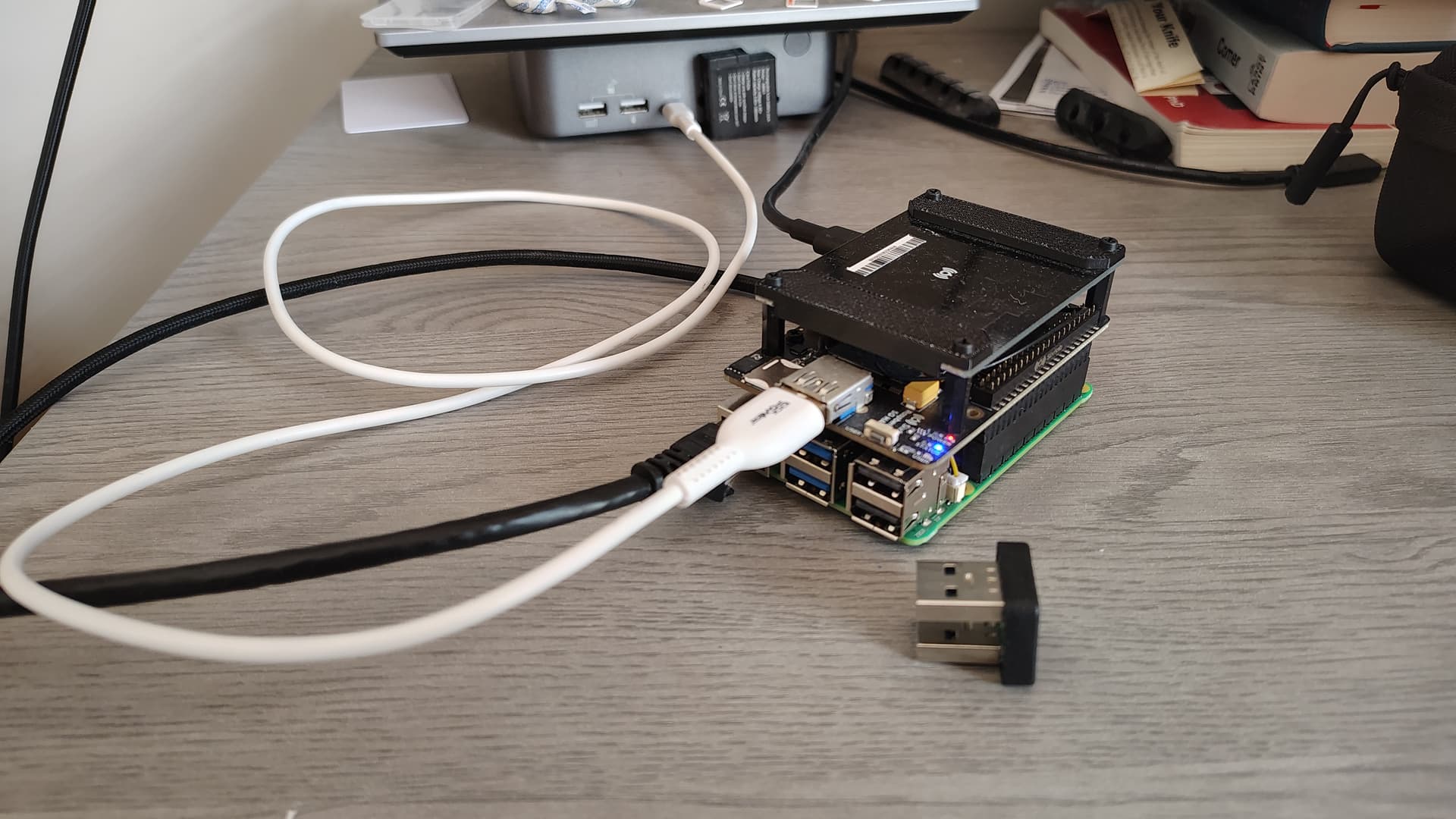
Could you please share the image of your setup?
Also share the response of the following AT commands.
AT+QGMR
AT+CPIN?
AT+COPS?
AT+QNWPREFCFG=“nr5g_disable_mode”
AT+QNWPREFCFG=“mode_pref”
AT+QNWPREFCFG=“nsa_nr5g_band”
AT+QNWPREFCFG=“nr5g_band”
AT+QNWPREFCFG=“lte_band”
AT+QNWPREFCFG=“rat_acq_order”
AT+CGDCONT?
AT+CFUN?
AT+C5REG?
AT+QNWINFO
AT+QENG=“servingcell”

PS. Please note that troubleshooting complex issues is often an iterative process. As we work together to identify the root cause, we may need to revisit steps or ask for additional information multiple times. We appreciate your patience and understanding—this back-and-forth helps ensure we resolve the problem thoroughly and get your device back to full operation as quickly as possible.

Hello @saeed ,

Here is the output of those commands from the Raspberry Pi:

AT+QGMR
RM502QAEAAR11A04M4G_01.203.01.203

OK

AT+CPIN?
+CPIN: READY

OK

AT+COPS?
+COPS: 0

OK

AT+QNWPREFCFG=“nr5g_disable_mode”
+QNWPREFCFG: “nr5g_disable_mode”,0

OK
AT+QNWPREFCFG=“mode_pref”
+QNWPREFCFG: “mode_pref”,AUTO

OK

AT+QNWPREFCFG=“nsa_nr5g_band"
+QNWPREFCFG: “nsa_nr5g_band”,2:41:66

OK

AT+QNWPREFCFG=“nr5g_band”
+QNWPREFCFG: “nr5g_band”,41:77:78

OK

AT+QNWPREFCFG=“lte_band”
+QNWPREFCFG: “lte_band”,2:41:66

OK

AT+QNWPREFCFG=“rat_acq_order”
+QNWPREFCFG: “rat_order_pref”,NR5G:LTE:WCDMA

OK

AT+CGDCONT?
+CGDCONT: 1,“IPV4V6”,“fast.t-mobile.com”,“0.0.0.0.0.0.0.0.0.0.0.0.0.0.0.0”,0,0,0,0,“”,0
+CGDCONT: 2,“IPV4V6”,“ims”,“0.0.0.0.0.0.0.0.0.0.0.0.0.0.0.0”,0,0,0,0,“”,1
+CGDCONT: 3,“IPV4V6”,“sos”,“0.0.0.0.0.0.0.0.0.0.0.0.0.0.0.0”,0,0,0,1,“”,1
+CGDCONT: 4,“IPV4V6”,“tmus”,“0.0.0.0.0.0.0.0.0.0.0.0.0.0.0.0”,0,0,0,0,“”,0
+CGDCONT: 5,“IPV4V6”,“h2g2”,“0.0.0.0.0.0.0.0.0.0.0.0.0.0.0.0”,0,0,0,0,“”,0

OK

AT+CFUN?
+CFUN: 1

OK

AT+CEREG?
+CEREG: 0,3

OK

AT+QNWINFO
+QNWINFO: No Service

OK

AT+QENG=“servingcell”
+QENG: “servingcell”,“SEARCH”

OK

It seems to show no connectivity / searching.

Now here are the same commands issued from Windows:

AT+QGMR
RM502QAEAAR11A04M4G_01.203.01.203

OK

AT+CPIN?
+CPIN: READY

OK

AT+COPS?
+COPS: 0,0,“Boost Mobile”,13

OK

AT+QNWPREFCFG=“nr5g_disable_mode”
+QNWPREFCFG: “nr5g_disable_mode”,0

OK

AT+QNWPREFCFG=“mode_pref”
+QNWPREFCFG: “mode_pref”,AUTO

OK

AT+QNWPREFCFG=“nsa_nr5g_band”
+QNWPREFCFG: “nsa_nr5g_band”,2:41:66

OK

AT+QNWPREFCFG=“nr5g_band”
+QNWPREFCFG: “nr5g_band”,41:77:78

OK

AT+QNWPREFCFG=“lte_band”
+QNWPREFCFG: “lte_band”,2:41:66

OK

AT+QNWPREFCFG=“rat_acq_order”
+QNWPREFCFG: “rat_order_pref”,NR5G:LTE:WCDMA

OK

AT+CGDCONT?
+CGDCONT: 1,“IPV4V6”,“fast.t-mobile.com”,“0.0.0.0.0.0.0.0.0.0.0.0.0.0.0.0”,0,0,0,0,“”,0
+CGDCONT: 2,“IPV4V6”,“ims”,“0.0.0.0.0.0.0.0.0.0.0.0.0.0.0.0”,0,0,0,0,“”,1
+CGDCONT: 3,“IPV4V6”,“sos”,“0.0.0.0.0.0.0.0.0.0.0.0.0.0.0.0”,0,0,0,1,“”,1
+CGDCONT: 4,“IPV4V6”,“tmus”,“0.0.0.0.0.0.0.0.0.0.0.0.0.0.0.0”,0,0,0,0,“”,0
+CGDCONT: 5,“IPV4V6”,“h2g2”,“0.0.0.0.0.0.0.0.0.0.0.0.0.0.0.0”,0,0,0,0,“”,0

OK

AT+CFUN?
+CFUN: 1

OK

AT+CEREG?
+CEREG: 0,1

OK

AT+QNWINFO
+QNWINFO: “FDD LTE”,“310260”,“LTE BAND 66”,66561

OK

AT+QENG=“servingcell”
+QENG: “servingcell”,“NOCONN”,“LTE”,“FDD”,310,260,6E8F01,195,66561,66,4,4,A0F8,-122,-19,-82,7,0,-,2

OK

This seems to show successful connectivity. Why is this?

When I connect the module to my Windows PC, I use a simple USB-A to USB-C (white cable). When I connect it to the Raspberry Pi, I use the USB-A jumper included with the 5G Hat Kit (shown in the foreground):

Hello @Tornadocraver ,

Thank you for the detailed experiment.
It seems the issue is related to the USB Bridge, do you have a USB A-USB A cable to perform the test with Raspberry Pi?

Hello @saeed ,

That seems to fix it. I now have connectivity on the Raspberry Pi using a USB-A to USB-A cable:

AT+CEREG?
+CEREG: 0,1

OK

AT+COPS?
+COPS: 0,0,“Boost Mobile”,13

OK

Just in case something changed, I tried swapping back to the USB jumper, and it still fails to connect (+CEREG: 0,3). Any ideas why the USB bridge (included in the Sixfab 5G Modem kit) is not cutting it? Is it a lemon?

For now I can use the cable, but it is slightly bulky compared to the jumper.

Thanks!

Hello @Tornadocraver

So, it was the USB Bridge that didn’t work.

Let me send you some spare USB bridges.
Please confirm you are using Raspberry Pi 5.

Could you DM me your previous order number and shipping address?

Thank you